Operations
Operations
Log hours by person and project, and review draft, approved, and rejected time.
Operations focuses on work and time tracking so teams can support payroll input, delivery effort, and operational reporting.
Before you start
- Use employee names the same way they appear in your CRM employee directory (if you use both).
- Agree on project names so reports stay consistent.
Work and time tracking
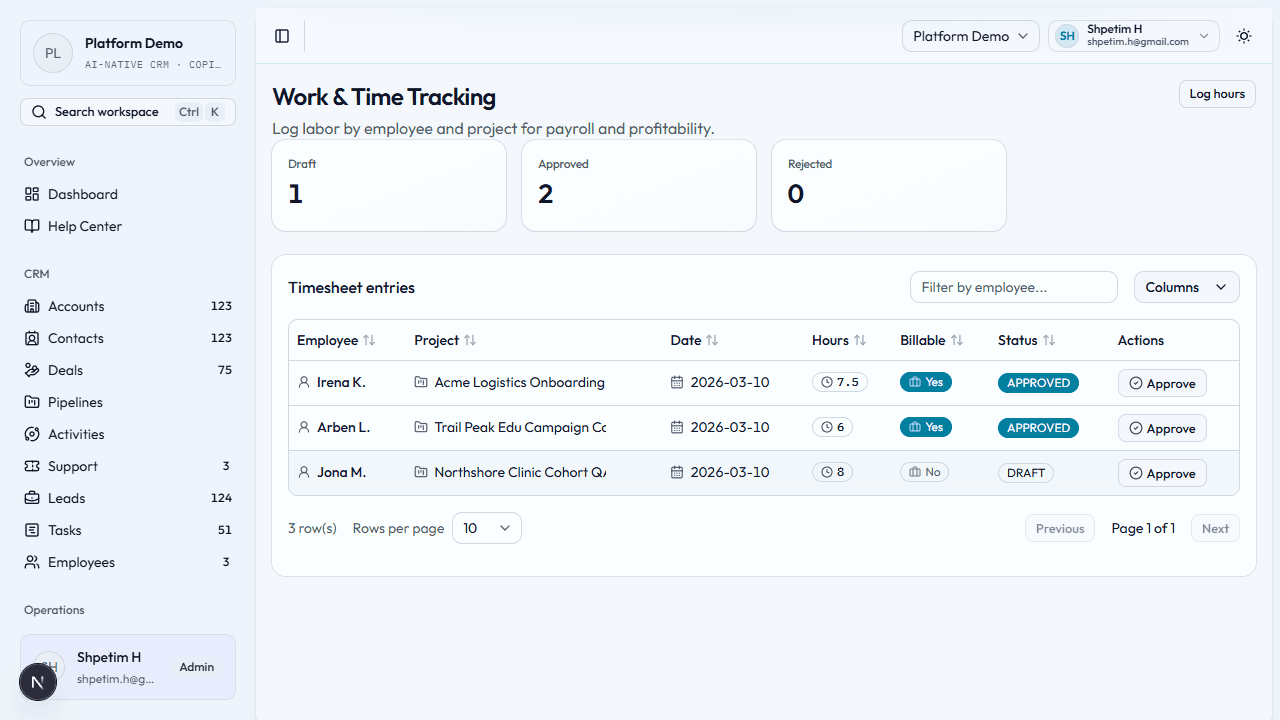
Path: Operations → Work & Time Tracking (/operations/time-tracking)
Log time
- Open the page and check draft, approved, and rejected counts.
- Choose Log hours (or similar).
- Enter employee, project, date, hours, and whether the time is billable (if your form includes that).
- Save. The entry appears in the table and in status summaries.
Review entries
- Scan the list for wrong dates, missing projects, or billable flags that need correction.
- Work with your manager or finance process for approval—states usually move from draft toward approved or rejected.
Tips
- Log time close to when work happens—memory fades.
- Fix rejected entries promptly so payroll and invoicing are not blocked.
Related
- CRM — employees and tasks
- Getting started
- Time tracking and delivery ops